Home › Forums › Hardware Talk › My Computer – Showcase › My retro builds – original and after-the-fact
 dr_st.dr_st
I have a number of retro builds still active/usable.
For pure DOS / Win9x gaming: System #1 here. However, most my DOS games I play in DOSBox on modern systems.
For WinXP gaming: System #2 in the above link
For Vista/Win7 era gaming: System #1 here
All three above were bought/assembled new and used as primary desktops in their respective eras. I have been keeping them alive by replacing aging/failing components and doing small upgrade here and there to make them more suitable for the modern era, where possible, without sacrificing retro functionality.
The problem is that the first two reside at my parents’ place, and I don’t have room for additional desktops. So I’ve been using laptops as additional retro builds when I need to do a little bit of testing:
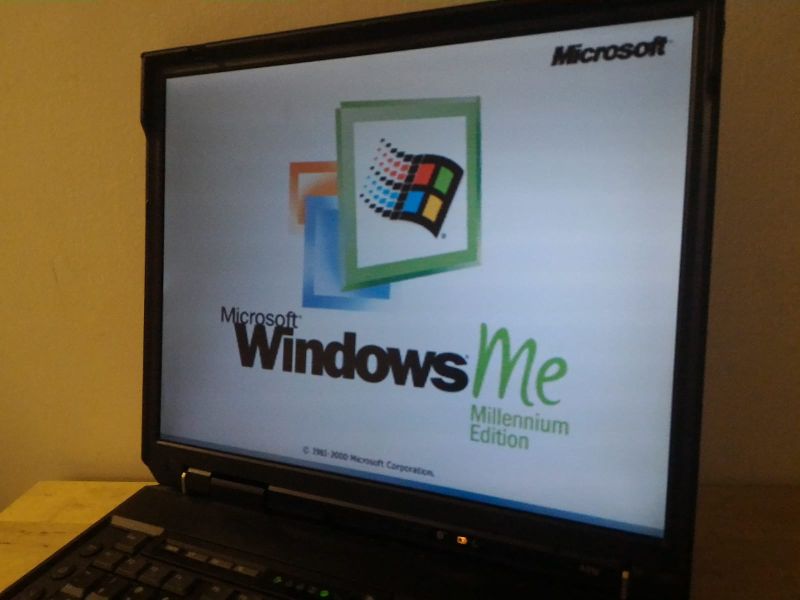
For Win9x: This Thinkpad A31p on which I installed Windows Millennium Edition, after replacing the LCD.
For WinXP: The Thinkpad T60 from this post. Used almost exclusively in the pictured desk setup.
 DJ_HiP
very nice, loving the Termaltake Xaser case on the XP machine!
Somewhat envious of how many you have setup, even over a number of locations, far too many of mine are packed away!
Have you kept all systems on rotational HDDs or gone the CF/SSD route?
dr_stAll on rotational HDDs. I will keep them while they last and then consider the options. Some inherited the old drives of systems upgraded to SSDs/faster drives. Most of the systems are used infrequently, so the drives seem to be holding on OK. *knocks-on-wood*
E.g., the drives that are currently in the XP desktop are those originally bought with the Vista system (late 2008, IIRC). The original drives from 2004 are long gone. The Vista system had been upgraded to newer, larger, maybe slightly faster drives many years ago. Now that it’s running Win7, if a drive ever needs replacement, it will probably be replaced with an SSD.
DJ_HiPNice!
I’m debating how many of my systems I upgrade to SSD, but at the same time the quality of life improvement by moving to SSD means I can enjoy the original system without the massive wait time, just don’t have the time like I did as a kid!
My XP system is already an SSD as the board supported SATA, but I’m currently looking at options for my various older systems.
 Watchful
Wow replacing a laptop LCD. I’ve broken enough stuff that I’d be afraid of doing damage.
DJ_HiPReplacing the LCD in a laptop isn’t as hard as you think.
Often the frame comes apart and there is a ribbon cable on the back of the LCD panel, which is usually just screwed in, so you never have to open the base of the laptop. (Of course every model varies, some are impossible or require the entire top section of the laptop to be replaced).
The challenge is finding a replacement LCD panel!
 Powerup Pete
I love playing retro games on my athlon 600 pc. It is equipped with a voodoo 3 2000 and a sound blaster live card. It has 384 MB of RAM installed.
Most recently I also bought a Iiyama Vision master pro 1413 CRT monitor. I have to say that it takes a bit of time to get used to again. It needs way more tinkering with the settings than an lcd and the screen can sometimes be too dark.
The computer is installed with Windows 98.
The computer is not connected to the internet and I’m always hassling with CD-RW discs to move mods or patches from my modern pc to the retro pc. 😀
I’m very happy with this build and enjoy playing it as long as it lasts.
WatchfulWindows 98 can use USB. I’ve found that older and lower density USB drives work best. My partner got a bag of cheap ones long ago, and I’ve been putting them to good use.
I recall getting networking going on Windows 95 and 98 back the day, for file sharing. Though it’s challenging getting modern Windows to share with such old versions as the original protocols and password algorithms are quite insecure. Another idea is to setup a Samba serve on a NAS, if you don’t mind tinkering. Linux builds of Samba should support the old sharing pretty well.
DJ_HiPYes, the Win98 USB driver that is hosted here https://www.philscomputerlab.com/windows-98-usb-storage-driver.html is excellent, covers basically all USB drivers so I’ve plugged in external HDDs, DVD, Keyboard/mice you name it.
I do connect my Win98 machine to the network for file transfers, I have an Apache webserver internally which I copy files I’ve downloaded using my main PC onto, then with the Win98 machine just browse the local http site, works well and is much faster than copying to and from USB1.1 drives !
Powerup PeteThanks for the tips guys.
If I get USB working would definitely improve the user experience.
dr_stIf I get USB working would definitely improve the user experience.
Oh, absolutely. I use USB flash drives on my Win98SE build, and even though it is just 1.1 speeds, it is still awesome for the convenience.
Years ago it was connected to the LAN, but as was said – it is a hassle to get sharing working between old and new systems nowadays. Besides, there is no longer a convenient Ethernet connection next to it, and WiFi on Win98SE is finicky.